1.Common NLP Techniques
| NLP Technique | Description |
|---|---|
| Tokenization(word segmentation) | Convert raw text into separate words or tokens. Word boundaries and punctuations vary across natural languages and therefore it can be a non-trivial task |
| Parsing & Tagging | Parsing is about creating a tree like structure with words, focusing on relationships between them. Tagging is attaching additional info with tokens |
| Stemming(词干提取) | Reducing words into their base form using rules. |
| Lemmatization(词形还原) | Reducing words into their base dictionary form (called as lemma) |
| Stop Word Filtering(过滤停用词) | Removing common,trivial words to reduce clutter and analyze. |
| Parts of Speech Tagging(词性标注) | Determining parts of speech for each work,and tag them accordingly |
| Named Entity Recognition(命名实体识别) | Determining proper names in the text, i.e., names of people, places. |
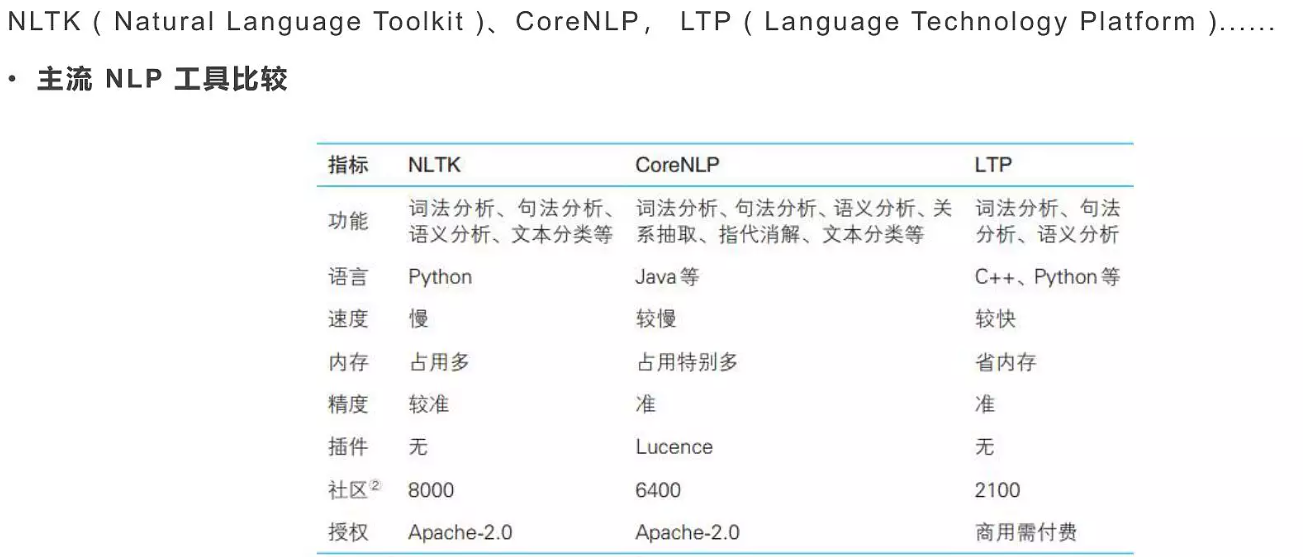
一些开源的工具:
1.1 Tokenization
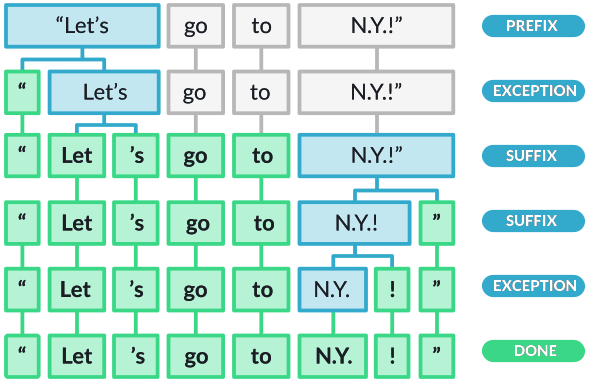
Tokenization is about breaking text into components (tokens)
- Tokenization uses prefix, suffix and infix characters, and punctuation rules to split text into tokens.
- Tokens are pieces of original text. No transformation performed.
- Tokens form building blocks of a “Doc” object
- Tokens have a variety of useful attributes and methods
1.2 Stemming
- Technique of reducing words into their base form by applying rules. The rules can be crude such as chopping of letters from end until the stem is achieved, or bit more sophisticated
- For examples words like boat, boater, boating may reduce to the same stem, which will help if you are looking for certain words
- One of the most common -and effective -stemming tools is Porter’s Algorithm developed by Martin Porter in 1980
- The algorithm employs five phases of word reduction, each with its own set of mapping rules
In the first phase, simple suffix mapping rules are defined, such as(在第一阶段,定义简单的后缀映射规则)
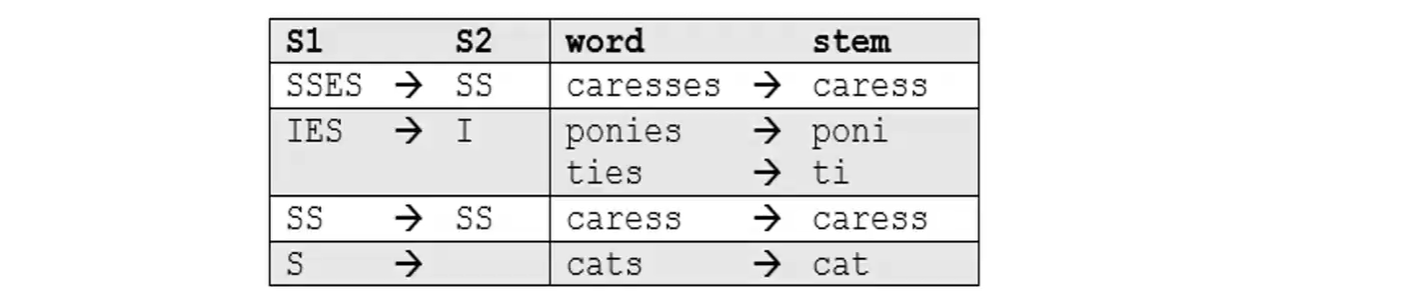
From a given set of stemming rules only one rule is applied, based on the longest suffix S1.(从一组给定的词干规则中,仅应用一个规则,基于最长的后缀 S1。)

More sophisticated phases consider the length/complexity of the word before applying a rule. For example:

- Snowball is the name of a stemming language also developed by Martin Porter.(这种算法也称为 Porter2 词干算法。它几乎被普遍认为比 Porter 更好,甚至发明 Porter 的开发者也这么认为。Snowball 在 Porter 的基础上加了很多优化。Snowball 与 Porter 相比差异约为5%。)
- The algorithm used here is more accurately called the “English Stemmer” or “Porter2 Stemmer”.
- It offers a slight improvement over the original Porter stemmer, both in logic and speed
1.3 Lemmatization
- In contrast to stemming, lemmatization looks beyond word reduction, and considers a language’s full vocabulary to apply a morphological analysis to words.
- The lemma of ‘was’ is ‘be’ and the lemma of ‘mice’ is ‘mouse’. Further, the lemma of ‘meeting’ might be ‘meet’ or ‘meeting’ depending on its use in a sentence
- Lemmatization is typically seen as much more informative than simple stemming
- Some libraries such as Spacy have opted to support only lemmatization and do not support stemming techniques
- Lemmatization looks at surrounding text to determine a given word’s part of speech, it does not categorize phrases
1.4 Stop Word Filtering
- Words like “a” and “the” appear so frequently that they don’t require tagging as thoroughly as nouns, verbs and modifiers
- We call these stop words, and they can be filtered from the text to be processed.
- NLP libraries typically hold a list of stop words. For example,Spacy holds a built-in list of some 305 English stop words
1.5 Parts of Speech Tagging
- Parts of Speech tagging is a technique of using linguistic knowledge to add useful information to tokens (words)
- Parts of Speech is a categorization of words in a natural language text, that are governed by the grammar.
- In English language there are ten parts of speech -noun, pronoun, adjective, verb, adverb, preposition, conjunction, interjection, determiners, and articles.
- For example, in English, Parts of Speech mean categorizing tokens as noun, verb, adjective, etc. Most NLP libraries have additional tags such as plural noun, past tense of a verb etc.
- The premise is that the same word in a different order may mean something completely different.
- In NLP,POS tagging is essential for building parse trees, which are used for building named entities and noun phrases,and extracting relationships between words.
1.6 Named Entity Recognition
- Named entities are real-world objects (e.g. persons, organizations, cities and countries, etc.) that can be given proper names
- Named-entity recognition (NER) seeks to locate and classify named entities in unstructured text into pre-defined categories such as the person names, organizations, locations, medical codes, time expressions, quantities, monetary values, percentages, etc.
- NER helps to extract main entities in a text, and detect important information, which is crucial if you are dealing with large dataset.
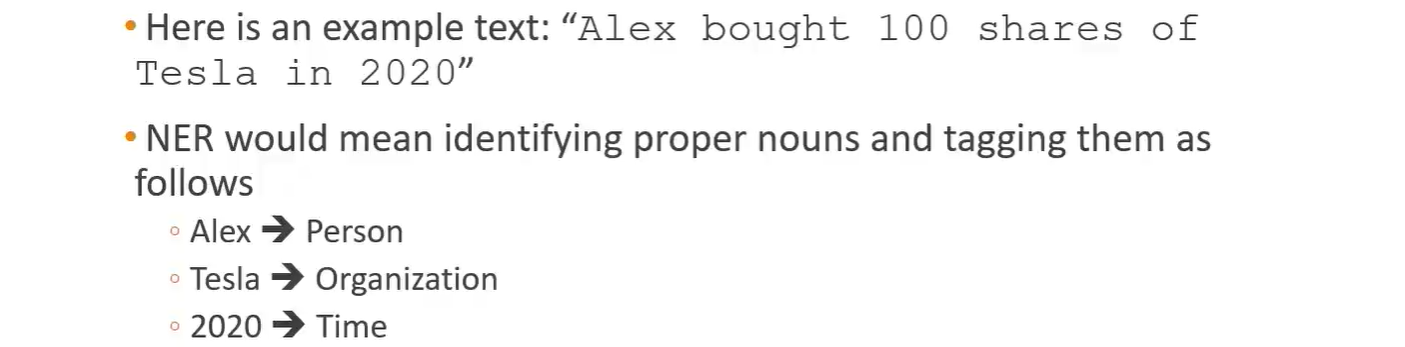
Business Use Cases for NER:
- Categorizing tickets in customer support
- Gain insights from customer feedback
- Speeding up content recommendation
- Processing resumes
- Detecting fake news
- Efficient search algorithms
2.Introduction to NLTK and Spacy
2.1 NLTK
- NLTK-Natural Language Toolkit is a very popular open source.
- Initially released in 2001, it is much older than Spacy (released 2015) Created essentially for teaching and research
- It also provides many functionalities, but includes less efficient implementations.
2.2 Spacy
- Open Source Natural Language Processing Library.
- Designed to effectively handle NLP tasks with the most efficient implementation of common algorithms
- Designed to get things done
- For many NLP tasks, Spacy only has one implemented method, choosing the most efficient algorithm currently available.
- This means you often don’t have the option to choose other algorithms.
- It is an optionated software!
- For many common NLP tasks, Spacy is much faster and more efficient, at the cost of the user not being able to choose algorithmic implementations.
- However,Spacy does not include pre-created models for some applications, such as sentiment analysis, which is typically easier to perform with NLTK.
NLTK VS Spacy(processing tests)
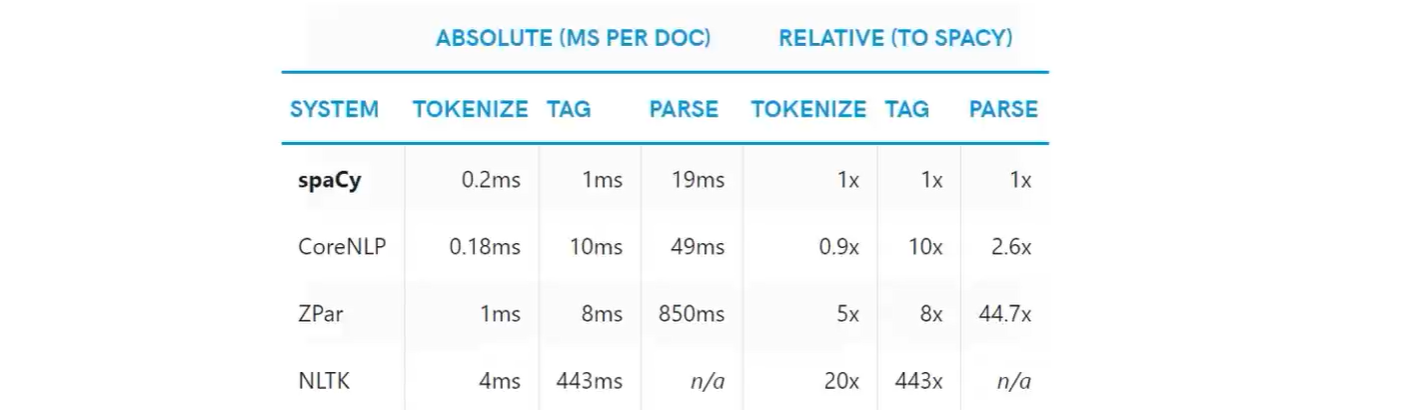
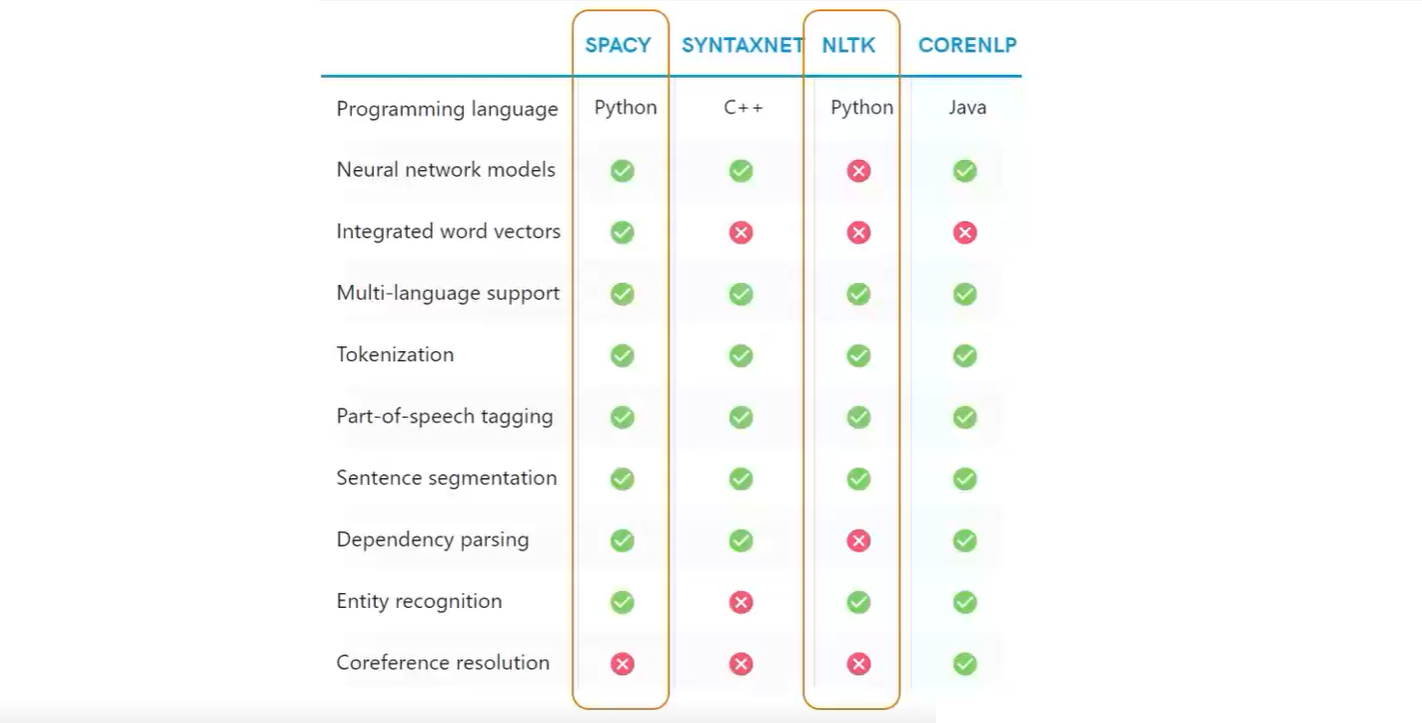
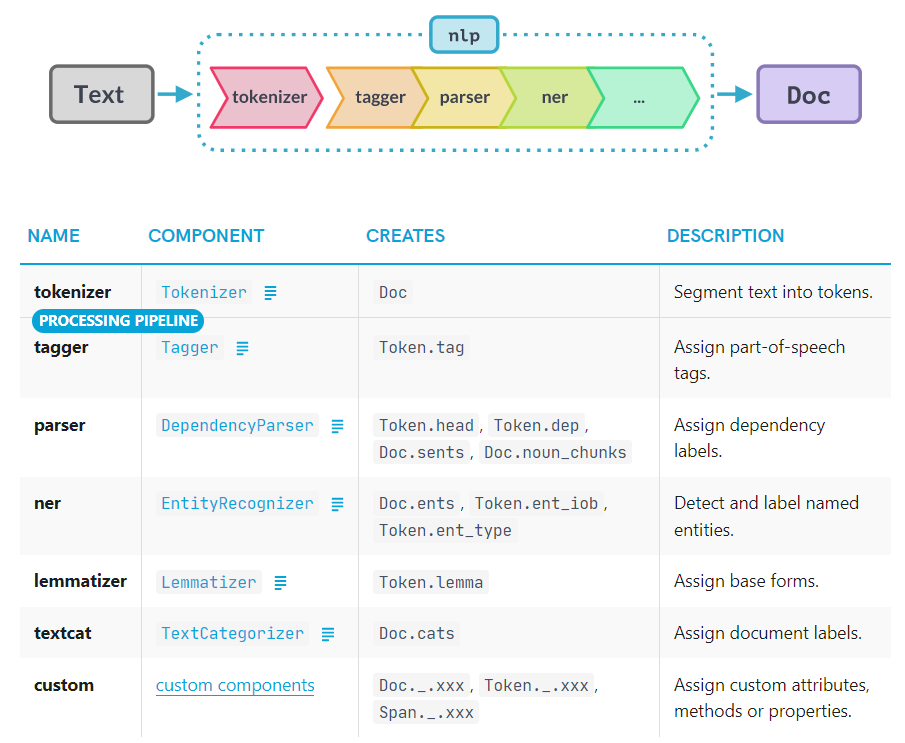
Spacy works with a pipeline object

- The
nlp()function from Spacy automatically takes raw text and performs a series of operations to tag, parse, and describe the text
installing Spacy:
Download Spacy
1
pip install Spacy -i https://pypi.doubanio.com/simple
Download English language library and link with Spacy(这条指令貌似执行下载的结果也是
spacy-model en_core_web_sm包,可以使用下面的指令安装)1
python -m spacy download en
或者在管理员模式下,调整anaconda源,并使用anaconda中已经集成了spacy的英文model
1
2
3
4
conda config --add channels https://mirrors.tuna.tsinghua.edu.cn/anaconda/pkgs/free/
conda config --add channels https://mirrors.tuna.tsinghua.edu.cn/anaconda/pkgs/main/
conda config --add channels https://mirrors.tuna.tsinghua.edu.cn/anaconda/cloud/conda-forge/
conda config --set show_channel_urls yes1
2
3conda install -c conda-forge spacy-model-en_core_web_sm
conda install -c conda-forge spacy-model-en_core_web_md
conda install -c conda-forge spacy-model-en_core_web_lg
3.Spacy
3.1 Introduction
此处有一些额外的参考:
- spacy官方网站:
https://spacy.io/usage
导入spacy包,并导入一个en的模型
1 | import spacy |
将一句话导入nlp()的模型:
1 | doc = nlp(u'Apple is looking at buy a U.K. startup for $10 Billion') #u表示unicode string |

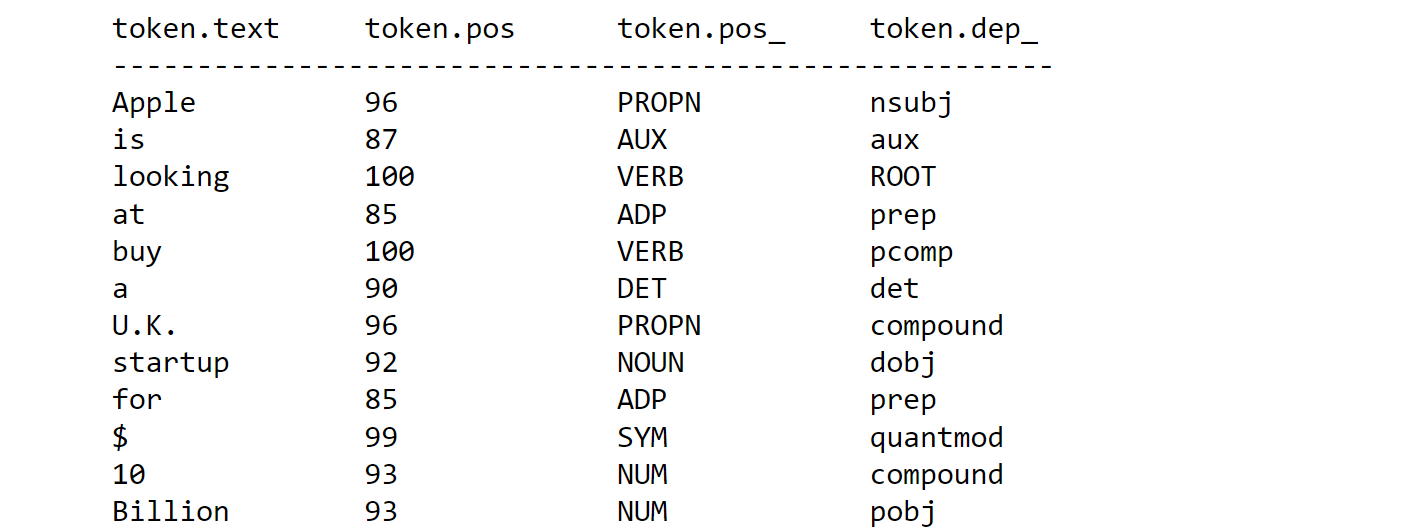
- doc object has tokens
- 原始句子有一下几个属性:
token.pos词性参考token.pos_词性表示token.dep_给出更多的信息,比如依存关系
1 | for token in doc: |
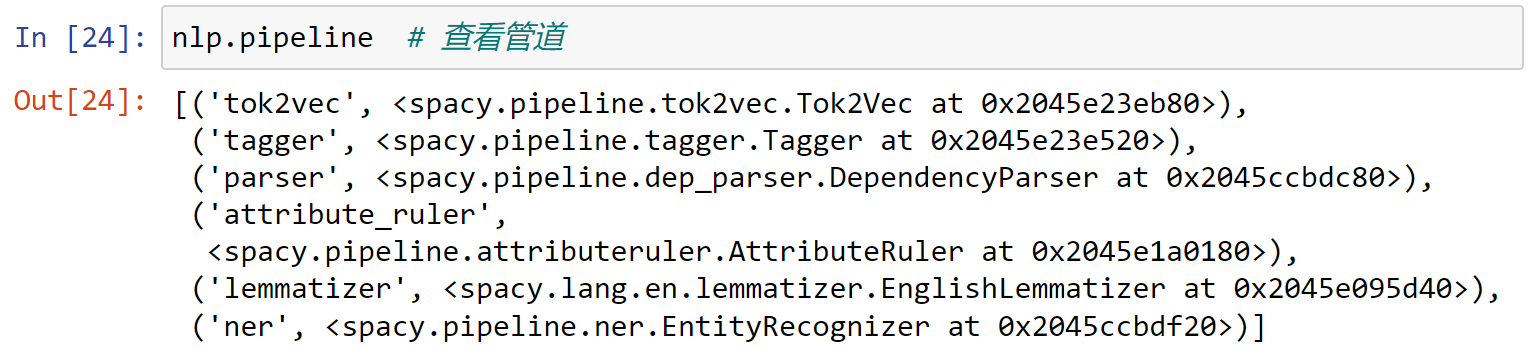
查看nlp()管道中包含的属性:
1 | nlp.pipeline # 查看管道 |
具体的属性说明如下:
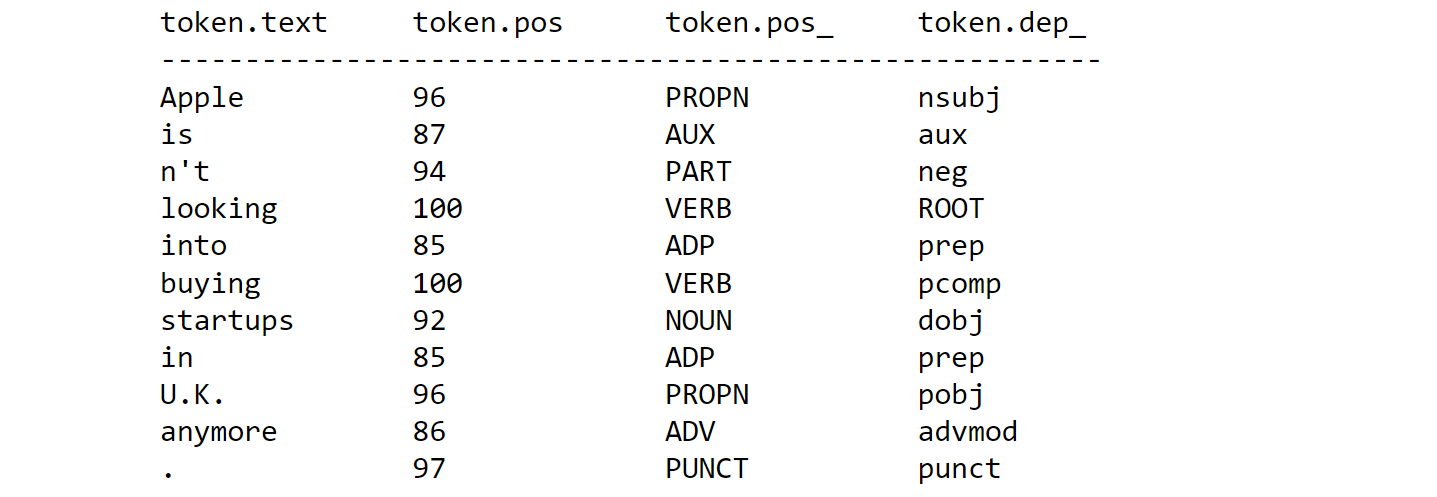
再导入一句话,查看处理的结果:
1 | doc2 = nlp("Apple isn't looking into buying \ |
1 | print('%-15s%-15s%-15s%-15s'%('token.text', 'token.pos', 'token.pos_', 'token.dep_')) |
可以发现spacy能够区分is 和n't是两部分,同时能够区分U.K.中的.和句号之间的区别:
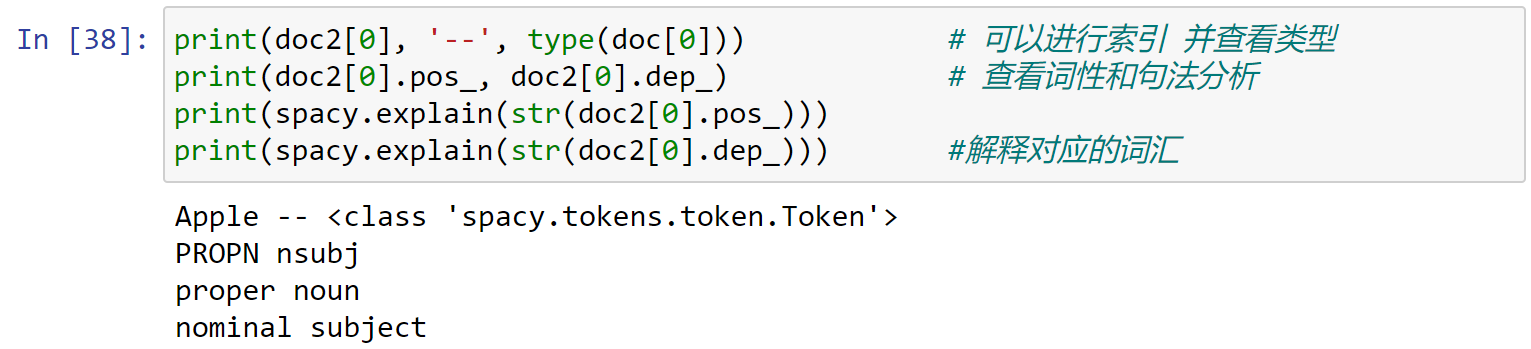
doc对象还可以进行索引,并对索引对象查看属性,同时可以使用spacy.explain进行描述:
1 | print(doc2[0], '--', type(doc[0])) # 可以进行索引 并查看类型 |
span对象:span对象是doc对象的一个切片
1 | doc3 = nlp(u'Although commmonly attributed to John Lennon from \ |
对这句话中的quote进行切片:
1 | life_quote = doc3[16:30] |

查看该切片的数据类型,可以发现,为span:
1 | type(life_quote) |

doc.sents:将一段话按照句子进行切分:其每一句话均为一个span对象:
1 | doc4 = nlp(u'This is first sentence.Hey, second sentence. \ |
1 | for sentence in doc4.sents: |
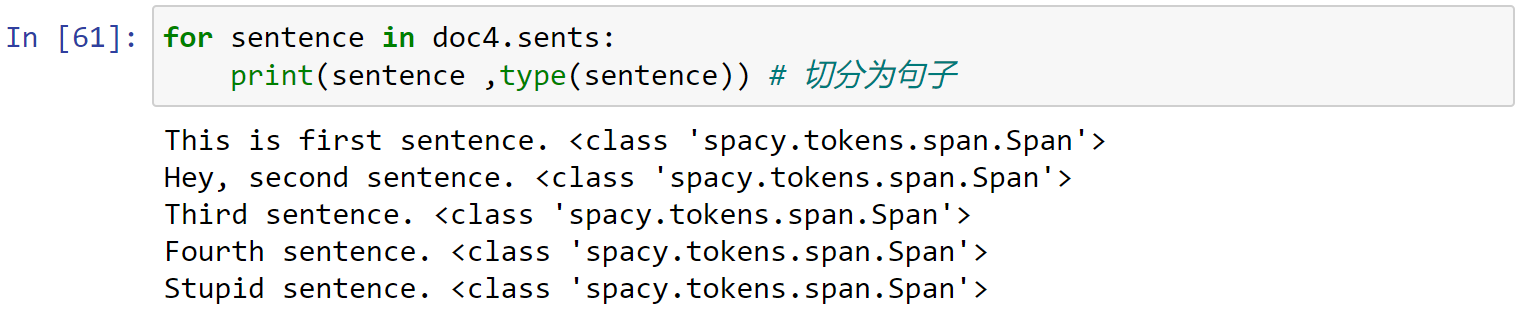
同时可以使用doc.is_sent_start判断某个词是否为一句话的开始:
1 | print(doc4[0], doc4[0].is_sent_start) # 询问是否为一句话的开始 |
3.2 Tokenization
Spacy处理一句话变成为Tokenization的过程:
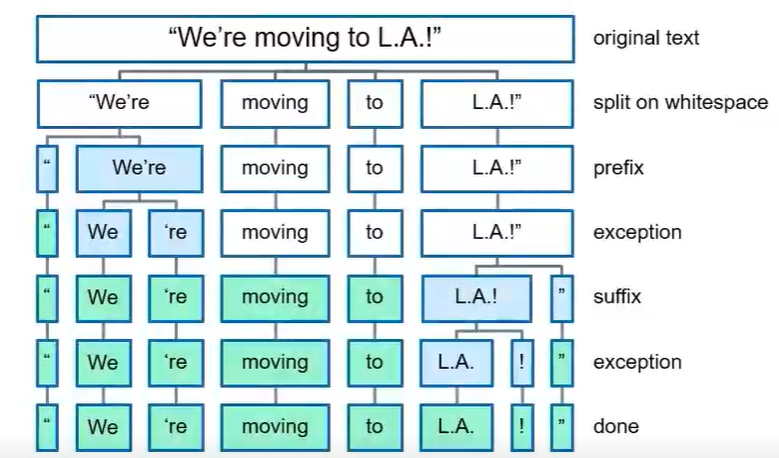
1 | import spacy |
- 分割多个引号:
1 | doc = nlp(u'"We\'re moving to L.A.!"') |

- 分割链接:
1 | doc2 = nlp(u"We're here to help! Send snail-mail,\ |

- 分割特殊符号:
1 | doc3 = nlp(u"I paid $50.23 for a used furniture.") |

- 分割
.号:
1 | doc4 = nlp(u"Let's visit St. Louis in U.S. next month") |

同时:spacy.tokens.doc.Doc中的对象不支持修改:
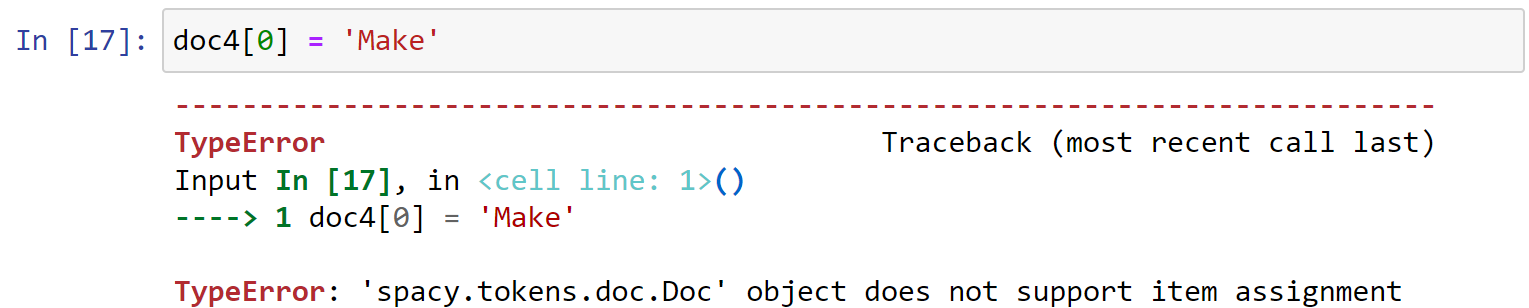
Name Entity:
entity.text:实体内容entity.label_:实体标签
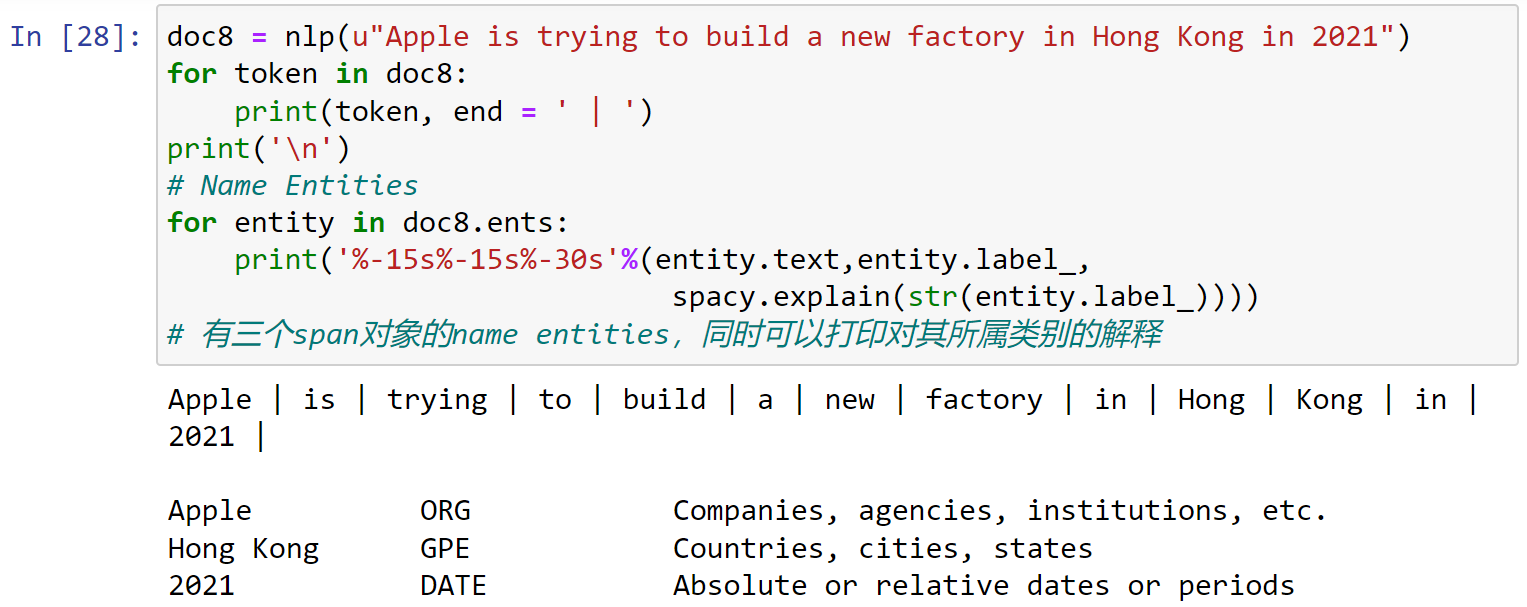
1 | doc8 = nlp(u"Apple is trying to build a new factory in Hong Kong in 2021") |
有三个span对象的name entities,同时可以打印对其所属类别的解释:
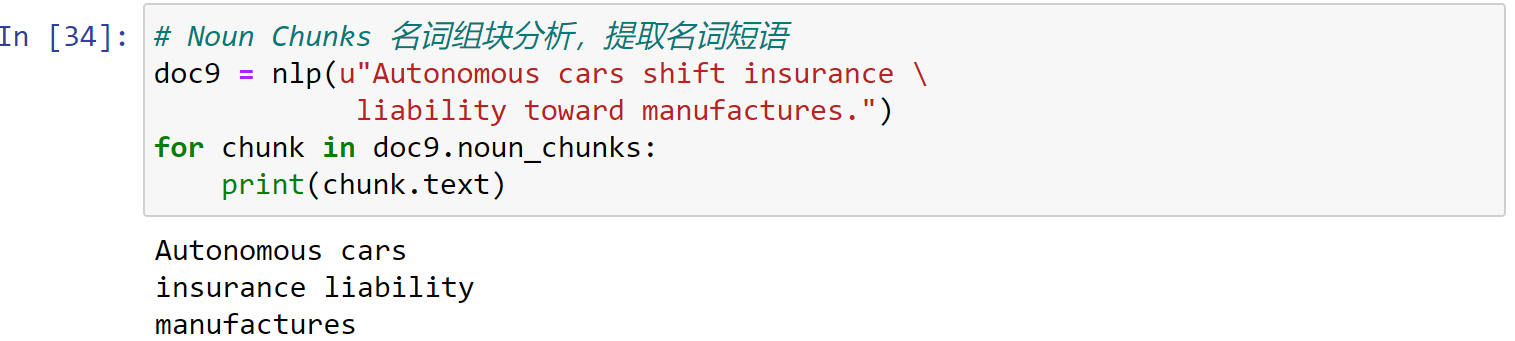
Noun Chunks:名词组块分析,提取名词短语
1 | doc9 = nlp(u"Autonomous cars shift insurance \ |
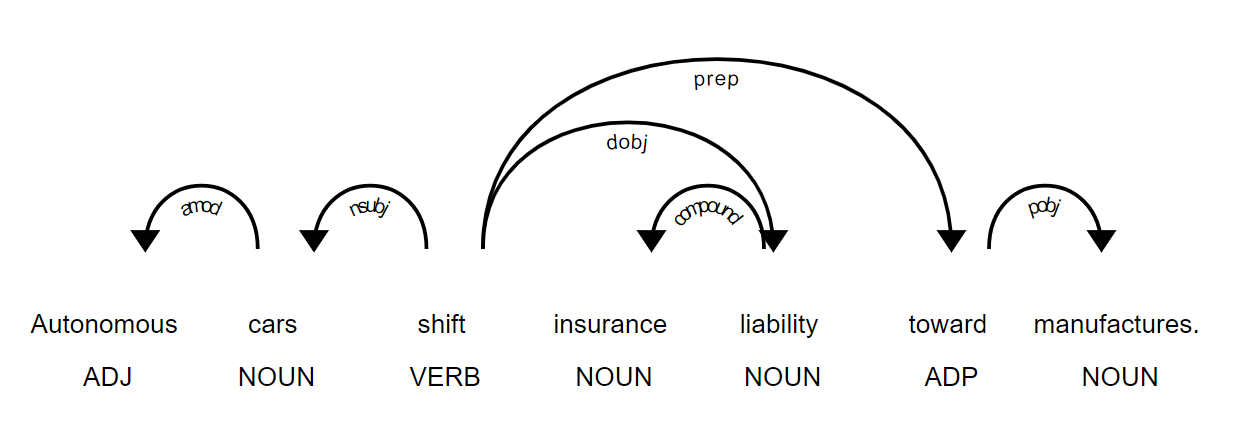
visualization
依存关系的可视化:
1 | from spacy import displacy |
Name Entity的可视化:
1 | doc8 = nlp(u"Apple is trying to build a new factory in \ |

3.3 Lemmatization
1 | import spacy |
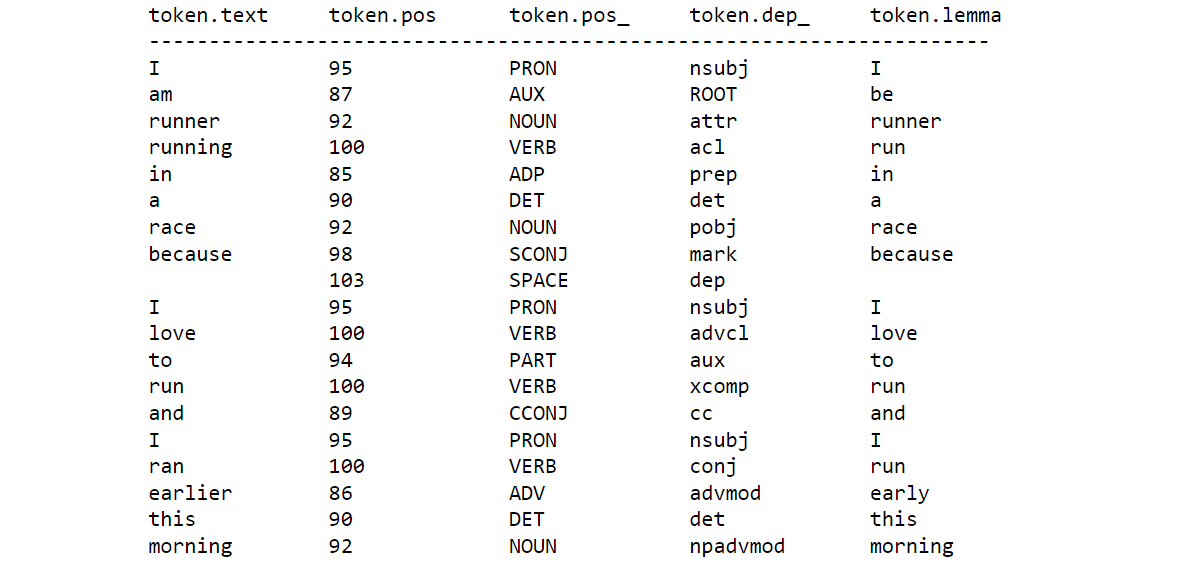
使用token.lemma_查看Lemmatization
1 | def show_lemmas(doc): |
测试第一个句子:
1 | doc = nlp("I am runner running in a race because \ |
- 不规则的名词复数可以变为原形:
1 | doc1 = nlp(u'I saw eighteen mice today') |

- 系动词会恢复原形:
1 | doc2 = nlp(u"That's an apple.") |

- 副词不会恢复原形,因为含义不同:
1 | doc4 = nlp(u"That was ridiculously easy and easily done and fairly") |
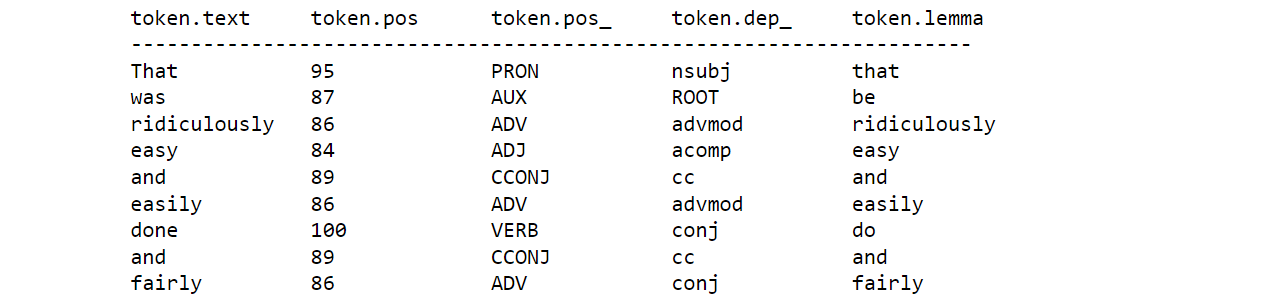
3.4 stop words
nlp.Defaults.stop_words默认的stop words列表
1 | print(nlp.Defaults.stop_words) |
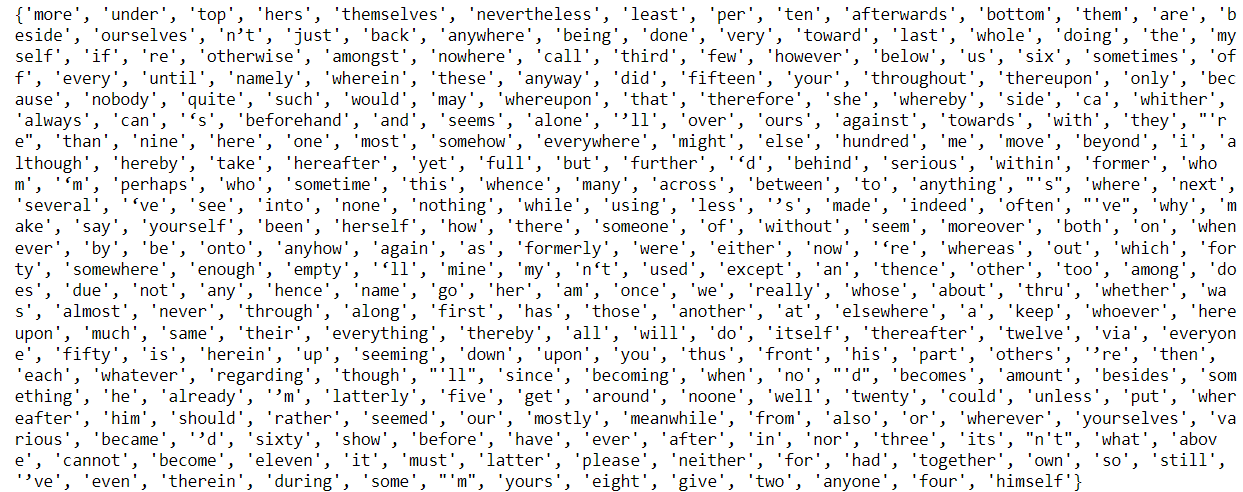
1 | nlp.vocab['whenever'] |

- 使用
is_stop判断是否为停用词
1 | nlp.vocab['whenever'].is_stop |

- 查看有多少个停用词:
1 | len(nlp.Defaults.stop_words) |

1 | # 设置停用词的两种方法: |

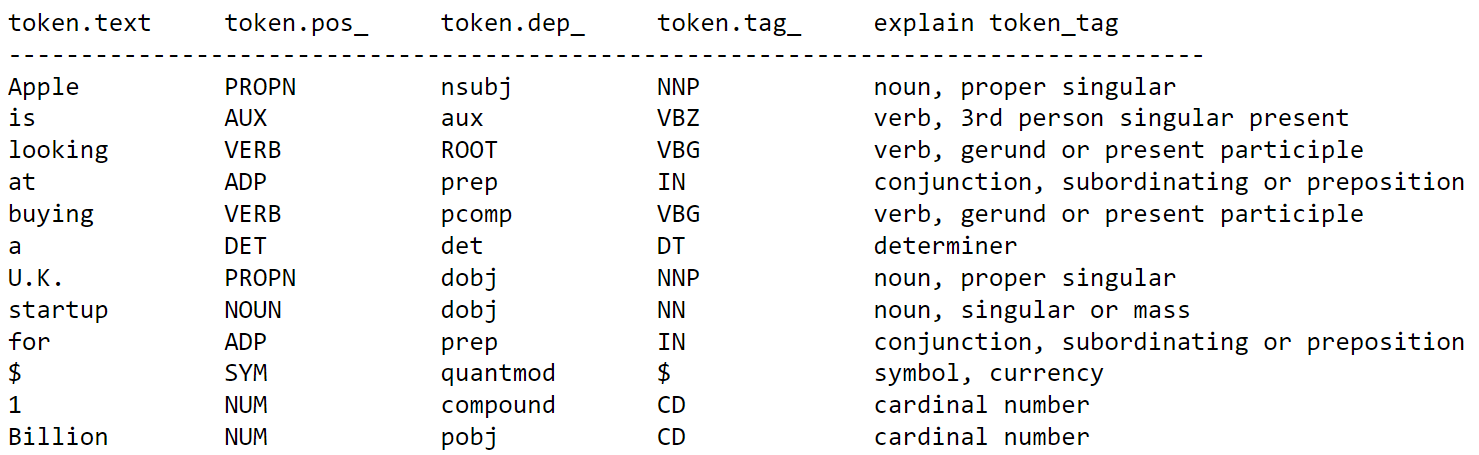
3.5 Speech tagging
使用token.tag_查看Speech tagging:
1 | print('%-15s%-15s%-15s%-15s%-30s'%('token.text', 'token.pos_', |
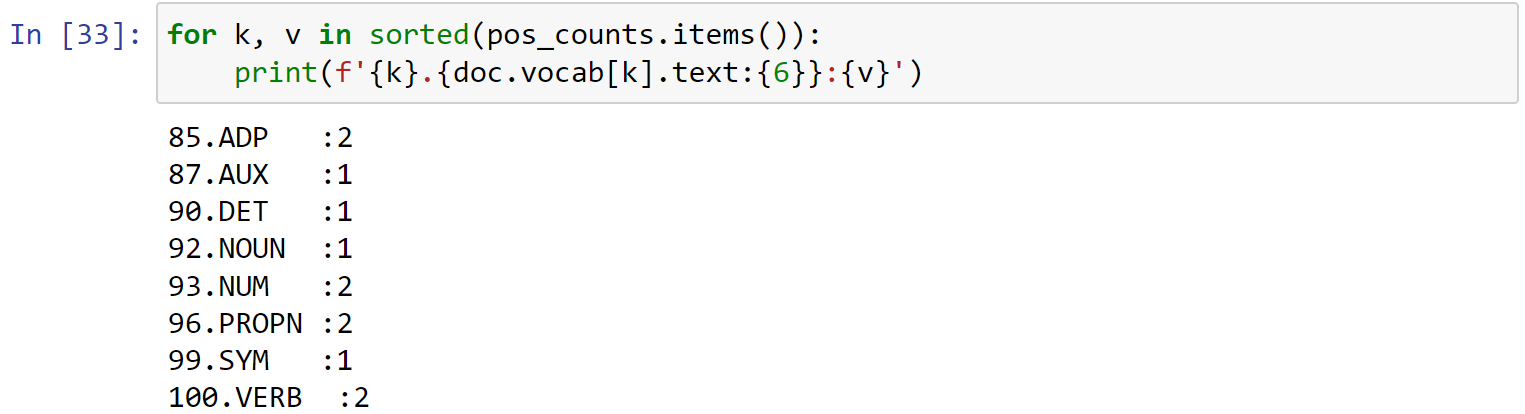
- 对POS Tags进行计数:
1 | doc = nlp(u"Apple is looking at buying a U.K. startup for $1 Billion") |

1 | for k, v in sorted(pos_counts.items()): |
1 | tag_counts = doc.count_by(spacy.attrs.TAG) |
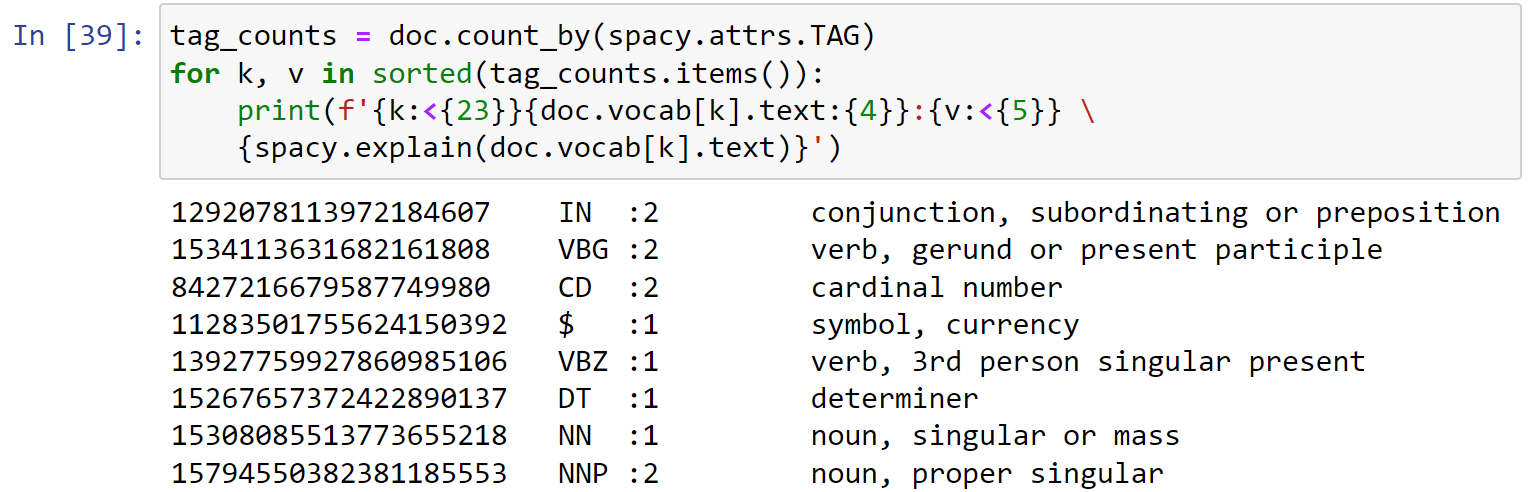
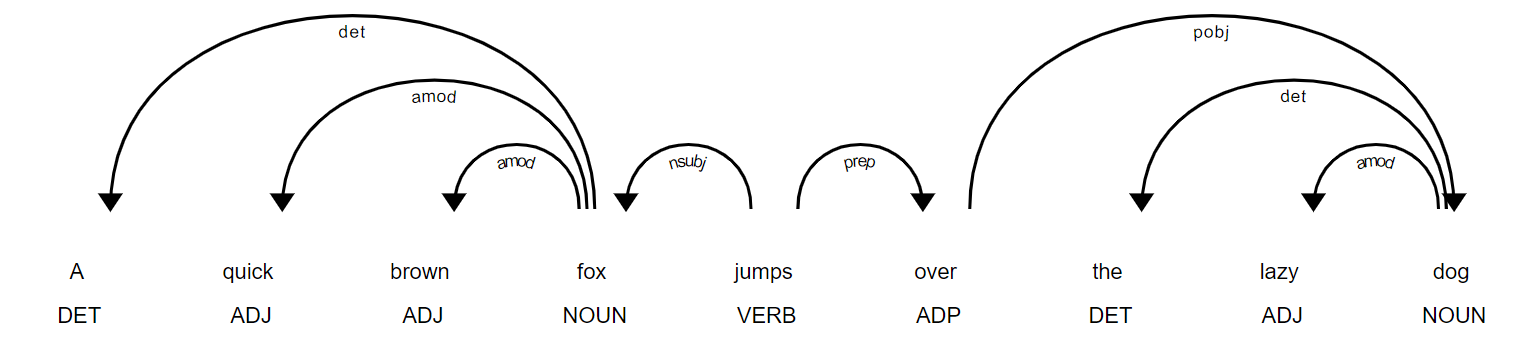
进行可视化:
1 | from spacy import displacy |
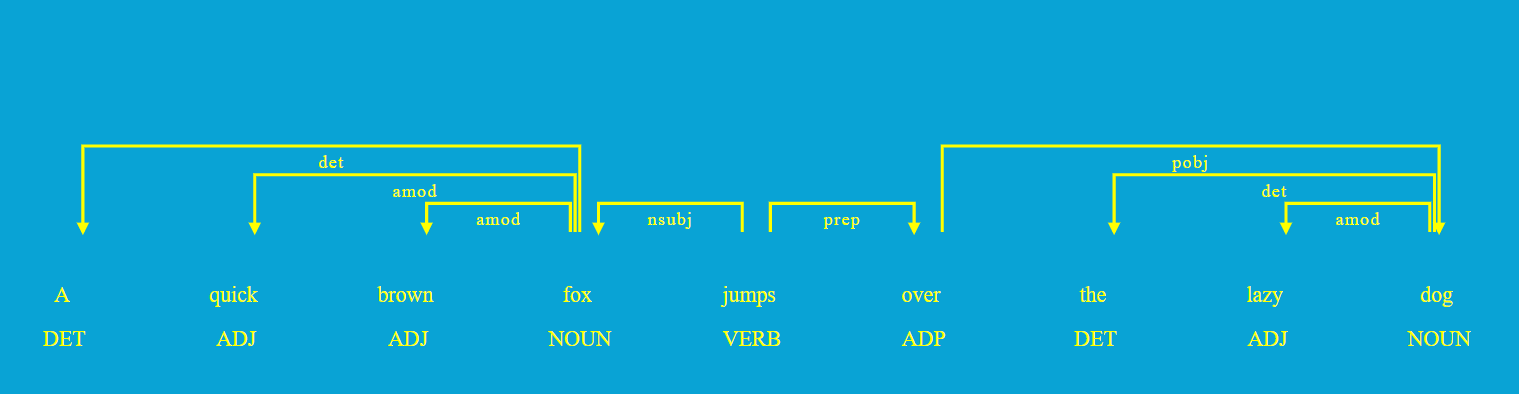
定义其他的可视化options:
1 | options = {'distance' : 110, |
3.6 NER
1 | import spacy |
定义显示命名实体识别的函数:
1 | def show_ents(doc): |
1 | doc = nlp(u'I am heading to New York City and will visits\ |

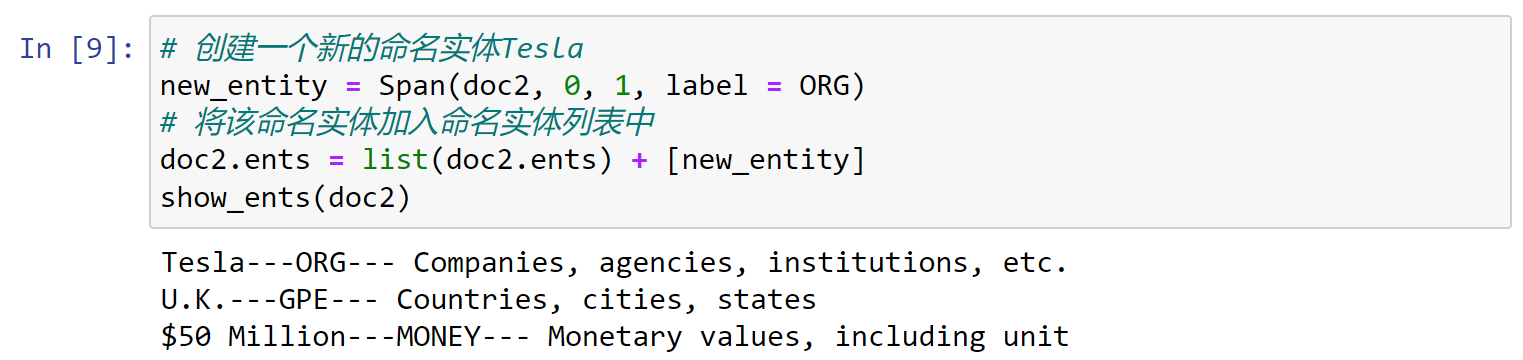
下面加入自定义的命名实体:
1 | doc2 = nlp(u'Tesla is planning to build a new \ |

查看命名实体的类型,可以看到其为spacy.tokens.span.Span类型:
1 | type(doc2.ents[0]) |

查看某一实体类型对应的编号:
1 | from spacy.tokens import Span |

1 | # 创建一个新的命名实体Tesla |
Adding multiple named entities for all matching spans
1 | doc3 = nlp(u"Our company plans to introduce new vaccum cleaner." |

创建匹配命名实体的短语列表:
1 | from spacy.matcher import PhraseMatcher |
1 | type(phrase_patterns[0]) |

1 | matcher.add('clientproducts', None, *phrase_patterns) |
1 | doc3 = nlp(u"Our company plans to introduce new vaccum cleaner." |

1 | prod = doc.vocab.strings[u'PRODUCT'] |

1 | new_entities = [Span(doc3, match[1], |

1 | doc3.ents = list(doc3.ents) + new_entities |
1 | show_ents(doc3) |

counting entities of a certain type(label)
1 | doc4 = nlp(u'I found a furniture priced at $2000 which \ |

1 | # 实体计数 |

可视化:
1 | from spacy import displacy |
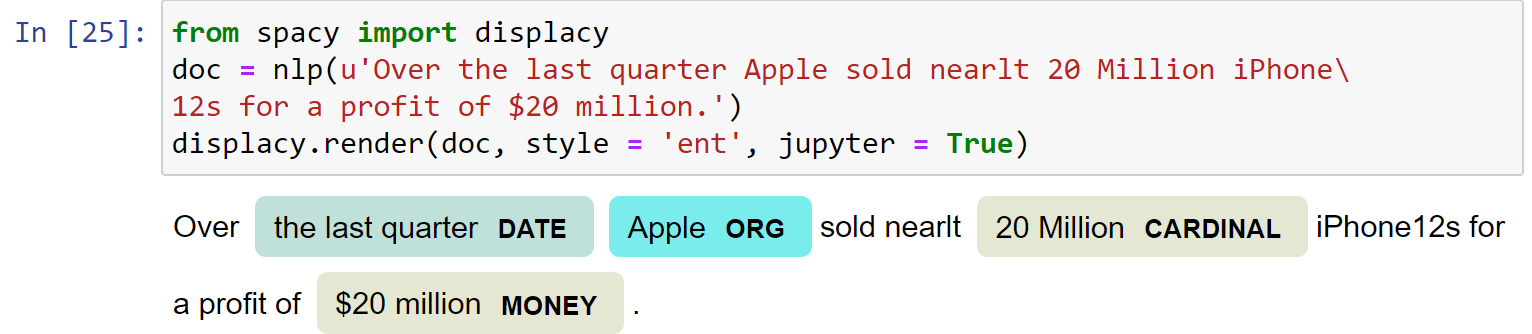
设置对特定类型的实体进行识别:
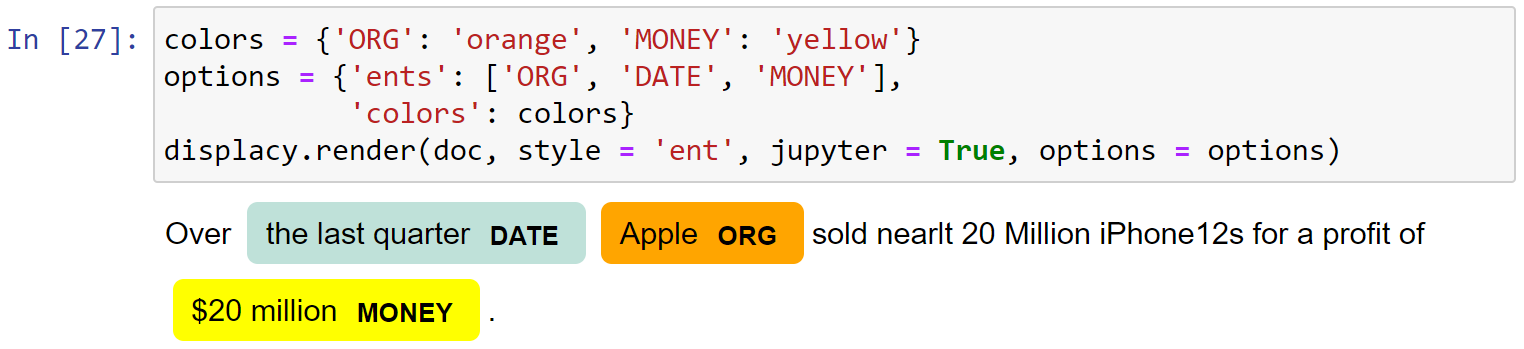
1 | options = {'ents': ['ORG', 'DATE', 'MONEY']} |

设定特定实体类型的颜色:
1 | colors = {'ORG': 'orange', 'MONEY': 'yellow'} |
4.NLTK
4.1 Stemming
1 | import nltk |
创建一个PorterStemmer()对象:
1 | p_stemmer = PorterStemmer() |
使用port算法,处理列表中的词汇:
1 | words = ['run', 'runs', 'runner', 'running', 'ran', 'easily', 'fairly'] |
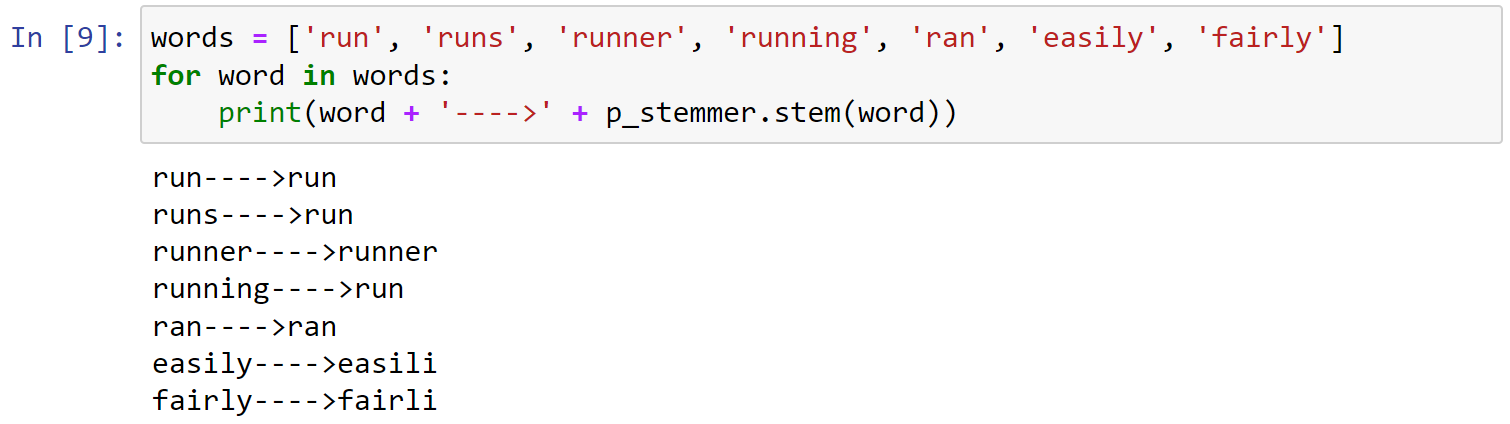
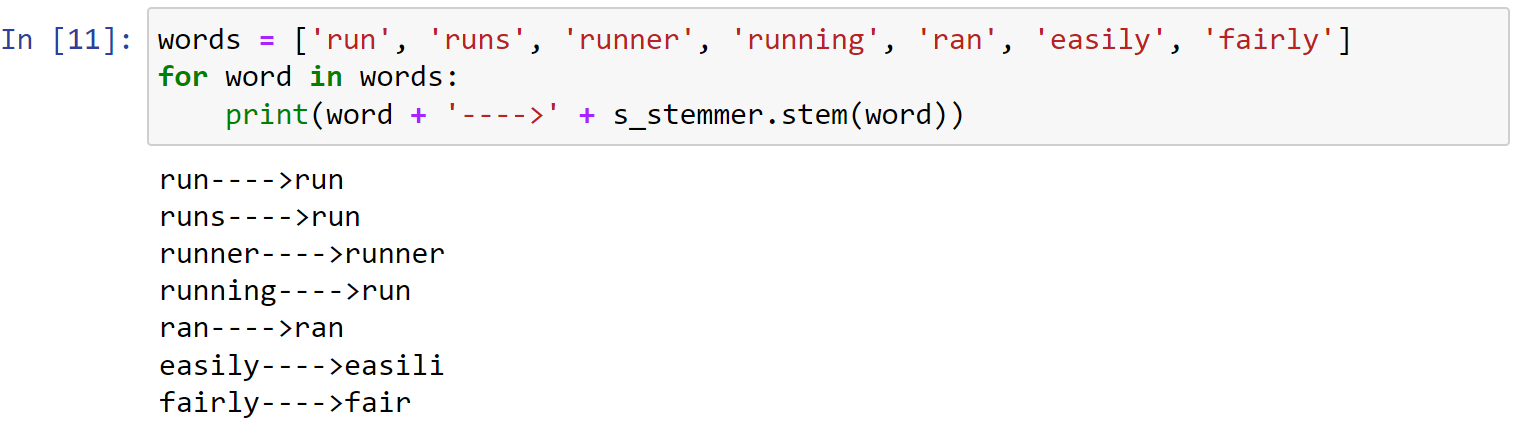
可以发现对于easily,fairly等词汇的处理并不智能。
下面尝试使用snowball算法:创建一个SnowballStemmer()对象:
1 | # snowball stemmer |
1 | words = ['run', 'runs', 'runner', 'running', 'ran', 'easily', 'fairly'] |
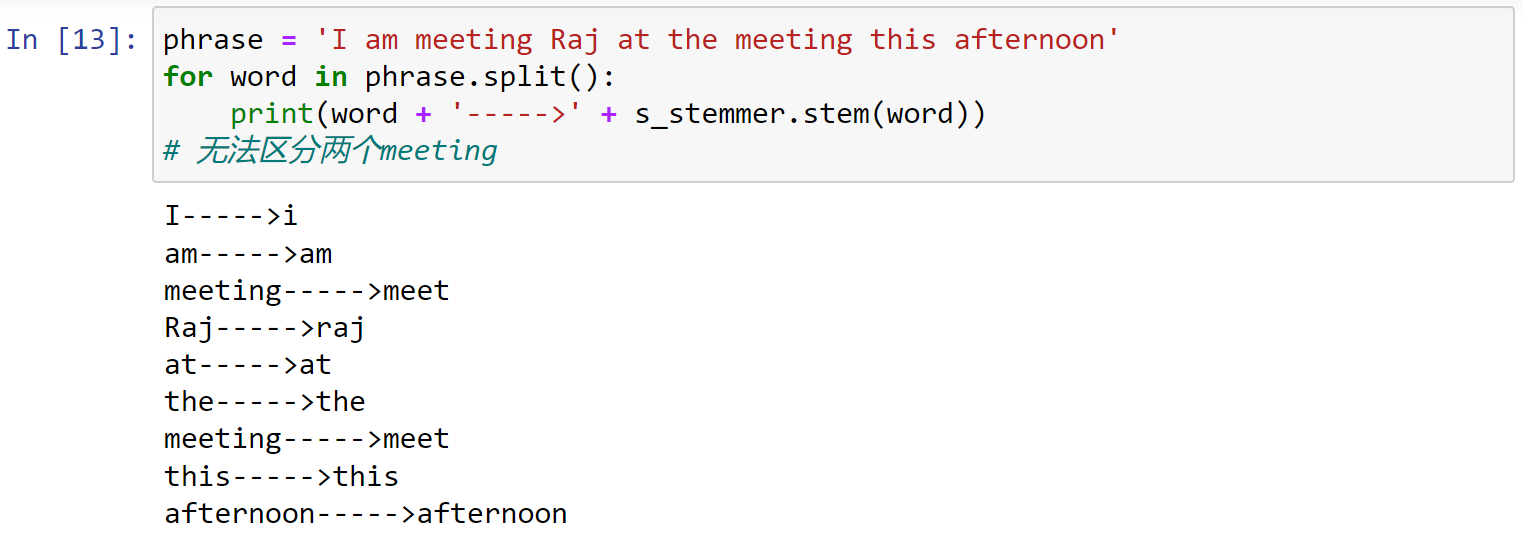
NLTK中的stemming算法的局限性:
1 | phrase = 'I am meeting Raj at the meeting this afternoon' |